Posts

Showing posts with the label Training

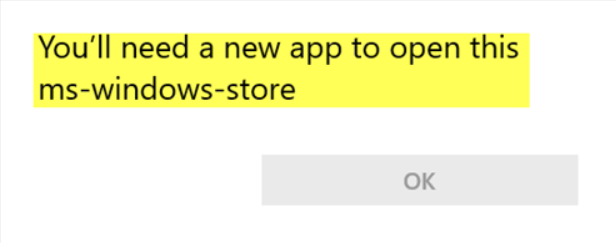
How to fix "You'll need a new app to open this ms-windows store" issue
Image
Recently, I had a user who informed me that Windows Photos was missing and that she was used to using it to review pictures. Photos is the Windows 10 application meant to replace the trusty old Windows Photo Viewer. The Photos application comes with Windows 10 by default but can be downloaded separately from the Windows Store. It was working fine with other accounts on the computer. Whenever trying to open the Windows Store to download and install the Photos application, the error "You'll need a new app to open this ms-windows store." Using Powershell, I managed to get it working. Read below to see how you can fix this as well.

Finding Apple Training Options is Easy

I started a new job a couple months ago. Back at the local university, where I should've stayed. Anyway, my job has me supporting Macs (among many other things), which I have only a little experience with. I'm no stranger to iPhones, iPads, AppleTVs, etc. I just haven't had a lot of seat time with a Mac. Most of the people on my new team haven't either. To fill that need, I volunteered to become the Mac expert for my team. I've either found a great need I can fill on my team or I've just made a huge mistake. Thus far, I believe it's the former. I was tasked with researching Apple training options for IT staff. The criteria was that it had to be more advanced than how-to-use-a-Mac. After doing a bit of digging here's what I found for Apple Training geared towards IT operations. 

PHP: Built-In Functions

In PHP, or any other coding language, a function is a reusable piece of code that you can call on throughout your application or script. PHP has over 1000 built in functions.

PHP: Loops

Sometimes when we're coding, we want to do something that would be very tedious. This is where loops come in. Loops repeat a series of instructions for you for a specified number of times.

PHP: Arrays

Back to more PHP, you may be wondering how PHP stores information. It can call or modify information in an SQL database, but we'll cover that later. So far, we know that we can save individual bits of information as variables. Let's look at Arrays. An Array is a list, and it allows you to save more than one bit of information within a single variable. Array Syntax A very simple array, could simply be a shopping list, like the example below. <?php       $SampleArray = array("Egg", "Tomato", "Beans");     ?>   An array starts with a variable, and then is followed by the =, just like we've done before. However, the array() portion of the statement is where we can put in multiple values. These could be strings, numbers, and/or previously declared variables. The information within the ellipses are separated by commas and each string is within double quotes, just like we've seen with past variable declarations or echo statements....

PHP: Flow Control

The phrase "Flow Control" might sound weird, as though we're talking about fluids or money. It sounds vague and almost clinical. While "Flow Control" might be something to think about for a variety of other topics, we're going to look at the flow control of data in PHP. As mentioned in the introductory post, lines of PHP code are referred to as statements. When we explored some of the syntax in the last post, the lines of code for declaring variables, performing mathematical operations, or echoing strings were all statements. Below, let's look at the statements we'd use to control the flow of information within a PHP script. Co mparisons Comparisons in PHP are done with Comparison Operators. I've listed the symbols below. > Greater than < Less than >= Greater than or equal to <= Less than or equal to == Equal to != Not equal to For example, below, we're going to see a PHP statement stating that 6 is less than ...

PHP: An Introduction

Have you had an idea for an application? Perhaps you have an idea for a web-app. Maybe you have a niche problem you'd like to solve, or maybe you just want to learn more about programming and software development. PHP is very capable and it's easy to get started. This is the first in a series of posts teaching PHP. I'll also have posts on SQL so you can work with information in databases and Git so you can use version control for your code. So, why PHP?

How RSA Encryption works

Image
If you hate math, you're gonna have a bad time: I'll let you know that right now. You might not have noticed but you've used RSA encryption before. It gets it's name from the MIT scientists Rivest, Shamir, and Adelman who invented the algorithm. Let's take a look at how RSA encryption works.

Apache, MySQL and PHP on the Raspberry Pi 3

Image
As mentioned before, I'm setting up a LAMP stack using Cent OS v7 on my Raspberry Pi 3. LAMP stands for Linux, Apache, MySQL and PHP. The A for Apache could also be E for Nginx (pronounced like Engine-Ecks) and the P for PHP could also be P for Perl or Python. This software together forms what's referred to as a "stack", which is simply a common development term for a set of software that works together for a specific application. In this post, I'll be covering the installation and initial configuration of Apache, MySQL and PHP.

Learning Linux Basics

I could write several articles on using the Linux command line. However, while reinventing a wheel can be fun sometimes, my best sources that I've used have been the Command Line course on Code Academy , LinuxCommand.org , and the Unix Visual Quickstart Guide . Between those three sources and plenty of practice, you'll get the hang of it pretty quickly. Practice means breaking stuff and figuring out how to fix it. One of my college instructors once told us that Wisdom comes from Experience and Experience comes from Pain. Breaking stuff can be painful but it's only bad if you don't learn from the experience.

Quick Look: LDAP

You may not realize it but you've very likely used LDAP. If you've signed onto a computer at a business or a school/college campus within the last 30 years then you almost definitely have. LDAP stands for Lightweight Directory Access Protocol. It's an open standard being supported by companies such as Microsoft, Apple, IBM, etc. I've already described DNS as akin to a phonebook for the internet. However, LDAP is like a company-wide phonebook. LDAP is the protocol for a special database that's been designed to store attributes about users, services, etc.

Introduction to SELinux (100th Post!)

SELinux stands for Security Enhanced Linux and was developed, in part, by the NSA. Eventually, SELinux was released under open-source license and has made it's way into a number of Linux distributions.

Quick Look: Kerberos

You know how after you've signed on to your workstation, you can open up your Outlook or Lync without having to sign into them? Or, you can pull up your company's intranet without having to sign your username and password again? That's something called single-sign-on (SSO) and it's made possible by Kerberos. Kerberos is a security protocol for authentication. According to Greek mythology, Kerberos was the three-headed dog that guarded the gates of Hades.

SSH Keys and SSH Hardening in CentOS 7

Image
I touched on SSH configuration in my post about performing the initial configuration on my CentOS Pi . Aside from one tweak to the config file, there wasn't a lot to do. In this post, I'm going to dive a bit deeper into how SSH Keys work, how to set it up in your environment, and then I'll dive a bit deeper into locking down the SSH configuration.

CentOS 7 Raspberry Pi Initial Configuration

Image
I've recently gotten a Raspberry Pi 3 and I've installed the ARM build of CentOS v7 on it so that I can have a small server to play around with some web stuff. My experience in IT has been largely Windows Server focused (AD, Exchange, System Center, etc.), storage, virtualization, backups, etc. Not much Linux or development exposure. I'd like to learn more about that area of IT, so I picked up a Pi and am creating an environment at home to learn more about Linux, Apache, PHP, MySQL and Git. In this post, I'm going to talk about the initial configuration of CentOS after you've installed it on your Pi.

Quick Look: The Vi editor

I've had plenty of exposure to Linux over my years of working with computers but I have a confession: I've never used the Vi editor until recently. I bought a Raspberry Pi 3 to build a small Web-dev environment and reacquaint myself with Linux. I installed an ARM build of CentOS v7 on it and when I went to go through the initial configuration, I learned real quick that nano was not installed by default. Nano has always been my text editor of choice since the entirety of my Linux experience has been Ubuntu or Debian, (which is why I've installed CentOS). This isn't going to be a deep dive into Vi, just a basic intro to how to use it.

Installing CentOS 7 on a Raspberry Pi 3

Image
The Raspberry Pi is awesome. If you're like me, you bought one to tool around with for educational purposes. You can run Kodi or gaming console emulators on it or you can combine some together for a tiny OpenStack cluster. At, $50-$60, they're easy on the wallet and running off of 5v USB power makes them pretty energy efficient. Sure, it's only a 1Ghz ARM processor which limits your OS choices but I'd rather have a Pi than running an old Dell PowerEdge or HP Proliant that I bought off of Craigslist. Instead of installing the usual Raspbian OS, this guide is on installing CentOS 7. However, the process described below is relatively universal to whatever OS you want to install on your Pi.

Quick Look: DNS Records

If you're in IT then you've likely heard of DNS. Most of us aren't experts in it but perhaps you'd like to know more about it. I'll go over a quick intro to how DNS works at a very high level and then wrap up with a description of the different types of records, or types of information, that comprise DNS.

How Solid State Storage Works

If you're a computer guy (or gal), you probably already know what a Solid State Drive (aka, an SSD) is and the main thing most people who know about them only know that they're faster because they use memory chips rather than spinning platters in traditional HDDs. Have you ever wondered how they really work though? If you're not a computer guy (or gal), then lets bring you up to speed (pun intended) with why people are ditching spinning disks for SSDs.

How Hard Disk Drives Work

Hard Disk Drives (aka HDDs) have been around for quite sometime. If I had to guess, I'd say that the main demographic of my blog already knows roughly how a HDD works but for those who don't, that's OK. Computer parts are a commodity. It's easier to replace than it is to repair, so why does anyone need to understand how spinning disks work? If you're working with storage (IE, administering a SAN), it pays to understand how they work. Lets dive in.