Posts

Showing posts with the label vSphere

Implementing Storage DRS (SDRS) in VMware vSphere
Image
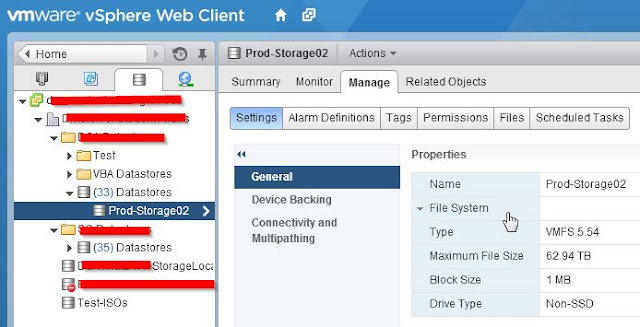
Tell me if this happens to you; You have a VMware virtual environment with a certain number of VMFS Datastores that are perpetually full all of the time. You might even need to Storage-vMotion VMs around to even out the storage load on your datastores and it's somewhat of a chore. Well, does it? This is where Storage DRS comes in. Just like how Distributed Resource Scheduler (DRS) for CPU and RAM resources manages VMs making sure the load between the hosts is relatively fair (or rather that the VM has the resources it needs to perform optimally), SDRS comes in to make sure VMDKs have access to the right amount of free storage & IOPS.

How I'm protecting vCenter in my environment

I'm on Reddit for both productive and unproductive reasons. Recently on the /r/VMware subreddit, there was a discussion asking redditors how they're protecting they're vCenter servers. This got me thinking about what I'm doing for my current vCenter server and what my options are going forward as my virtual infrastructure changes.

vSphere 5.1 upgrade phase 3: Converting to the VCSA & Wrap-Up

Image
In the previous parts of this upgrade project, I discussed upgrading vCenter itself followed by upgrading the hosts & VMs themselves and I'll end with converting my Windows vCenter install to VMware's own Linux-based vCenter Server Appliance.

vSphere 5.1 upgrade phase 2.5: Upgrading Everything Else

Image
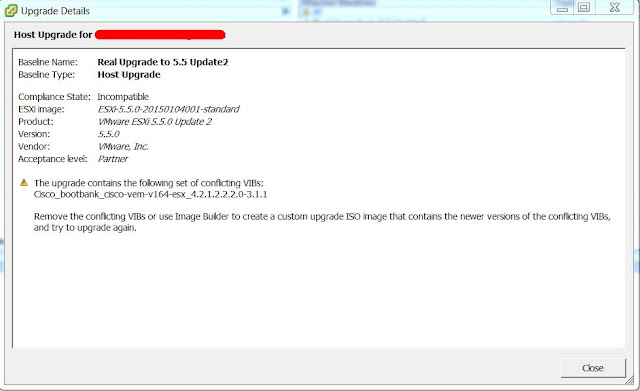
In my last post on my vSphere upgrade project , I wrote about my frustrating experience when upgrading our Windows vCenter install from v5.1 to v5.5. In this post, I'll talk about upgrading everything else. vCenter, while important, it's certainly not the only aspect of a vSphere install. You've also got VMware Update Manager (VUM), ESXi (the hypervisor installed on your host servers), your VMTools installs on your VMs and your virtual hardware version. Let's get started because we've got a lot to cover.

vSphere 5.1 upgrade phase 2: Upgrading vCenter

Image
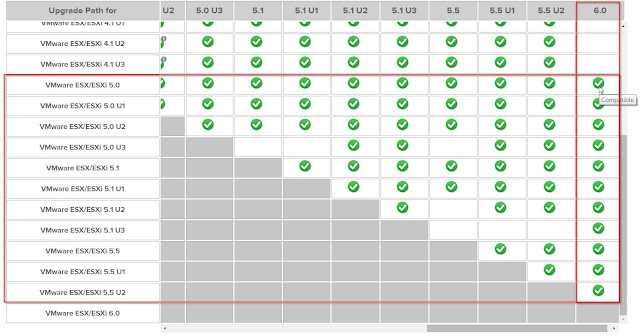
So, here at phase 2, I'm off to a rocky start out of the gate. Firstly, an update, no pun intended. We've decided on going to v6.0 rather than just going to v5.5 because there's no compelling reason not to. Normally, when I'm upgrading software, I go to the latest version unless there's a good reason not to. In this case, there's no big issues with v6.0 that I've seen. Yes, people have had problems but it seems like they're usually one-off issues.

Moving a VM between hosts without vCenter

Image
I was recently given a task of moving a VM used by our application development team from it's own little host to our production VMware infrastructure. This VM in particular has 12 disks, totaling 665Gb of data. Since this was sort of a chore, I figured I'd lay out the possible approaches for the next admin out there who isn't sure how do this. First, the basics. An option for the VM is to migrate using vMotion. You can migrate a VM between hosts and/or datastores with either vMotion or svMotion (Storage vMotion), respectively. This is really your best option if both of your hosts or datastores reside within the same vCenter environment. The main reason I'm writing this document is for the time(s) when you have to move a VM from a standalone host or from a host within a vCenter environment to a different standalone host or to a host within a different vCenter environment.

Upgrading to Unitrends Virtual Backup v8

Part of my responsibility is supporting our various Backup systems and for handling VM backups in the VMware world, there's 2 clear contenders winning the popular vote; The most popular is Veamm Backup&Restore, and the other popular option is Unitrends Virtual Backup (Formerly PHD Virtual Backup). I want to talk about my experience migrating from PHD v6.5 to UVB v8.

Sockets, Cores and vNUMA

So you've identified a VM in your environment that needs a little boost and you've decided to up the resources on it so it can adequately run whatever services your VM is providing. You go to up the vCPU and ask, "Do I add more sockets or more cores? What's the difference?"

vSphere 5.1 upgrade phase 1: Uninstalling Heartbeat

As our new virtualization admin, I've taken over the day-to-day administration of our UCS & vSphere infrastructure. I'm also in charge of the upgrade project for it. We're currently rockin' vSphere v5.1 on 2x Windows Server 2k8r2 vCenter VMs in a Heartbeat v6.6 configuration. We want to get to a single vCenter Server Appliance (VCSA) v5.5. I've broken this up into 3 distinct phases. In the first phase, we need to get to a single vCenter configuration. That means tearing down the Heartbeat configuration & decommissioning our secondary vCenter VM. In the second phase, I'll do a simple upgrade to the vCenter server to v5.5, followed by the hosts, VM hardware version & VMtools upgrade (with either VUM or pounding out something in PowerCLI). In the third phase, I'll use the VCS to VCSA fling to convert our Windows vCenter server to the Linux-based VCSA.

Backing up UCM & How to run a PowerCLI Script with Windows Task Scheduler

At my job, at the time of this writing, I'm the backup sysadmin in charge of our virtual infrastructure (Cisco UCS blades + vSphere 5.1). As my boss, who's the primary for these things, is taking on a new role (same company & still my boss), I'm on track to become primary for these things. As a part of that effort I've been playing catch-up to learn more about vSphere, PowerCLI & Powershell among several other things.